My VA Health: A Guide to Managing Your Care Online
My VA Health: A Guide to Managing Your VA Care Online
Managing health care can involve appointments, prescriptions, medical records, and messages to your care team. The Department of Veterans Affairs (VA) offers online tools that can help eligible Veterans handle many of these tasks. Depending on where you receive care, you may use the My VA Health portal, My HealtheVet, or other services available through VA.gov.
What Is My VA Health?
My VA Health is an online patient portal used by some VA health care facilities. It can give patients access to selected health information and services, such as viewing parts of a medical record, managing appointments, requesting prescription renewals, and communicating with a care team. The features available may vary by facility and by a patient’s care arrangements.
VA systems and services may change as facilities adopt new technology. If you are unsure which portal applies to you, check with your VA facility or visit the official VA website at VA.gov.
What You May Be Able to Do Online
Depending on the portal and services available to you, online tools may help you:
- Review certain health information and test results
- View or manage appointments
- Request prescription refills or renewals
- Send secure messages to members of your care team
- Update personal information or communication preferences
Not every service is available to every patient through every portal. For urgent medical concerns, do not rely on an online message. Contact your health care provider, call 911 for an emergency, or go to the nearest emergency department.
Getting Started
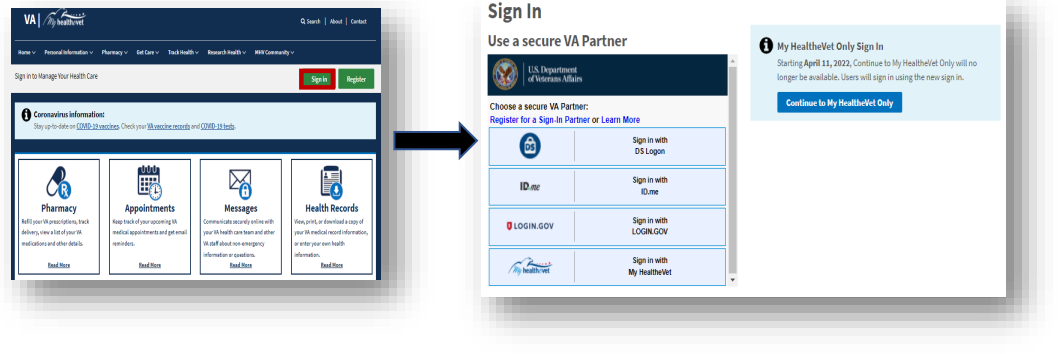
To use a VA online health service, you may need to sign in with a verified account. Follow the sign-in instructions on the official VA website, and use only trusted VA pages when entering personal information. If you have trouble accessing your account, contact VA support or ask your VA facility for help.
Once signed in, look for the sections related to appointments, prescriptions, messages, or health records. Review the portal’s guidance before sending a message or making a request, since some needs may require a phone call or an in-person visit.
Protecting Your Health Information
Your VA account may contain sensitive personal and medical information. Protect it by using a strong, unique password, signing out when using a shared device, and avoiding public computers for private health tasks when possible. Never share your password or verification codes with someone who contacts you unexpectedly.
Online Tools Support—but Don’t Replace—Your Care Team
VA health portals can make routine tasks more convenient and help you stay organized. They are not a substitute for professional medical advice or emergency care. If you have questions about your treatment, records, or which online service to use, contact your VA health care team.
For current information about VA health services and account access, start at VA health care on VA.gov.
6 Essential Tips for Managing Your VA Health Benefits
- Keep your VA health benefits information up to date.
- Use VA.gov or the VA Health and Benefits app to manage care.
- Schedule routine checkups and preventive screenings.
- Keep a current list of medications and allergies.
- Ask your VA care team about any new or worsening symptoms.
- Use secure messaging for nonurgent questions.
Keep your VA health benefits information up to date.
Keep your VA health benefits information up to date so the VA can contact you, coordinate your care, and determine your eligibility accurately. Review your contact details, address, insurance information, and other relevant records regularly, and update anything that has changed through an official VA channel. If you’re unsure what information to update or how to do it, contact your VA health care team or visit VA.gov.
Use VA.gov or the VA Health and Benefits app to manage care.
Use VA.gov or the VA Health and Benefits app to manage your VA care in one convenient place. Depending on your eligibility and the services available to you, you may be able to review health information, manage appointments, request prescription refills, and connect with your care team. Sign in through official VA channels to protect your personal information, and contact your VA facility if you need help accessing these services.
Schedule routine checkups and preventive screenings.
Schedule routine checkups and preventive screenings through My VA Health to stay up to date on your care. Regular visits give your VA health care team a chance to review your health, answer questions, and recommend screenings based on your age, medical history, and risk factors. Check your portal for appointment options, or contact your VA clinic if you need help scheduling.
Keep a current list of medications and allergies.
Keep a current list of all your medications and allergies to help your VA health care team make safer, more informed decisions. Include prescription drugs, over-the-counter medicines, vitamins, and supplements, along with the dose and how often you take each one. Note any medication allergies and the reactions you’ve had. Update the list whenever something changes, and bring it to appointments or share it through your VA health portal if that option is available.
Ask your VA care team about any new or worsening symptoms.
If you notice a new symptom or an existing one gets worse, contact your VA care team and describe what you’re experiencing, when it started, and whether anything makes it better or worse. Sharing these details can help your team decide what follow-up or care may be appropriate. If you think you’re having a medical emergency, call 911 or go to the nearest emergency department instead of waiting for a reply.
Use secure messaging for nonurgent questions.
Use secure messaging through your VA health portal to ask nonurgent questions, share updates, or follow up with your care team. It’s a convenient way to communicate without waiting on hold, and your message becomes part of your care correspondence. For emergencies or symptoms that need immediate attention, don’t wait for an online reply—call 911 or seek urgent care.